Skip to content

Your software already knows. Let it tell the customer.

The order shipped, the table is booked, the fees are due. One HTTP call sends an approved WhatsApp template from your own number — no Meta Cloud API, no nested components, no consent plumbing of your own.

talkv API v1.0 · 15 endpoints · same price as the screens, no API fee. Off until we switch it on for your workspace.

What you skip

The hard parts, already done.

Meta's Cloud API is a fine API with a long list of things you have to get right before it is safe to use. These are the ones we got right so you do not have to.

  • Plain phone numbers. 98250 12345, +91 98250-12345 and 919825012345 are the same number. A number without a country code is read in the workspace's country.
  • Templates by name, values as a list. "template": "order_shipped", "variables": ["Ravi", "#4521"] — not Meta's nested components.
  • Consent and opt-outs. Somebody who replied STOP is never messaged again, and you are told so in the response and the moment it happens.
  • The 24-hour window. A free-form reply outside it is refused with a sentence saying why, before it reaches Meta.
  • Never twice. Send the same Idempotency-Key again — after a timeout, a retry, a crash — and you get the first answer back instead of a second message.
  • Plain errors. "This person replied STOP on 3 October" rather than error 131050.

Before your first call

First, the parts a person has to do.

Meta requires a real person to approve a real business. None of this can be done through an API — ours or theirs.

Do step five first — it is the one that waits on us. Ask us to switch the API on.

  1. 01

    Create a talkv account at app.talkv.io and confirm the email address.

  2. 02

    Connect a WhatsApp number — Setup, then Connect. Meta asks the business owner to log in to Facebook and approve it; there is no way around that.

  3. 03

    Add a payment method in Meta's WhatsApp Manager. Meta bills the business directly for the messages themselves.

  4. 04

    Get templates approved. A message to somebody who has not written in the last 24 hours must be an approved template. Create them in talkv; Meta reviews each one (minutes to a day).

  5. 05

    Ask us to switch the API on. It is enabled per workspace while we are small. Then Settings → API creates a key.

  6. 06

    Add a webhook address (optional, recommended) in Settings → API, so talkv can tell your software about deliveries, replies and opt-outs.

  7. 07

    Top up the balance in Billing, if your workspace is charged.

One call

Send a message.

The message is handed to WhatsApp while the request is still open, so the answer says whether it went — not that it was accepted for processing.

Base address
https://app.talkv.io/api/v1
Authentication
Authorization: Bearer tvk_live_…
Keys made in
Settings → API, by an owner

A key belongs to the workspace, not to the person who made it, so it keeps working after they leave. We store only a hash of it. Keep it on your server — anybody holding it can message your customers.

Request curl
curl https://app.talkv.io/api/v1/messages \
  -H "Authorization: Bearer $TALKV_KEY" \
  -H "Idempotency-Key: order-4521-shipped" \
  -H "Content-Type: application/json" \
  -d '{
    "to": "+91 98250 12345",
    "template": "order_shipped",
    "variables": ["Ravi", "#4521"]
  }'
Answer 201
{
  "data": {
    "id": 812,
    "to": "+919825012345",
    "type": "template",
    "template": { "name": "order_shipped", "language": "en" },
    "text": "Hi Ravi, your order #4521 has shipped.",
    "status": "sent",
    "charged": true,
    "created_at": "2026-10-04T10:15:02+05:30"
  }
}

Settings → API

Keys and webhooks

Keys and webhooks, on one screen

Owners and admins make keys here, name them after what uses them, and see when each one was last used. Deleting a key stops it at once.

Below them sits your webhook address and its signing secret, with Send test event to check your end, and New secret if the old one may have been seen.
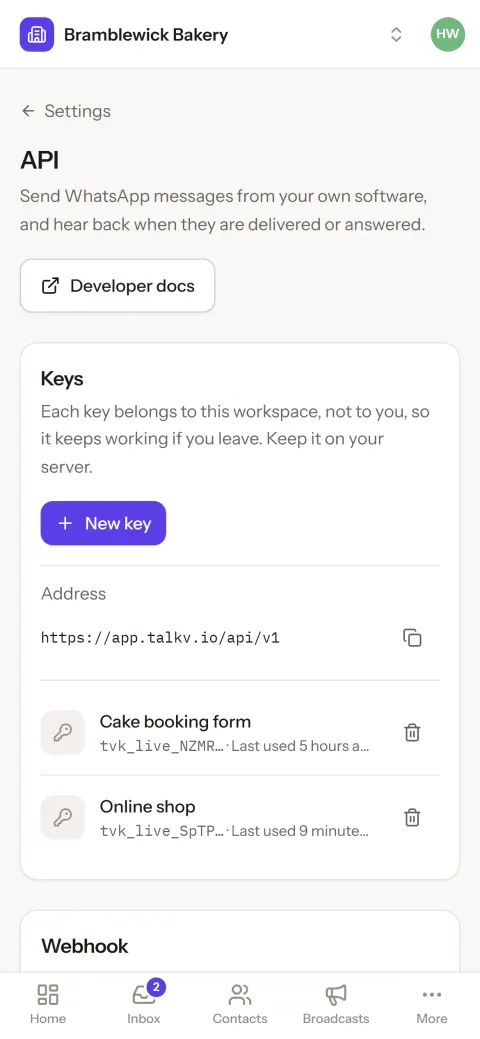
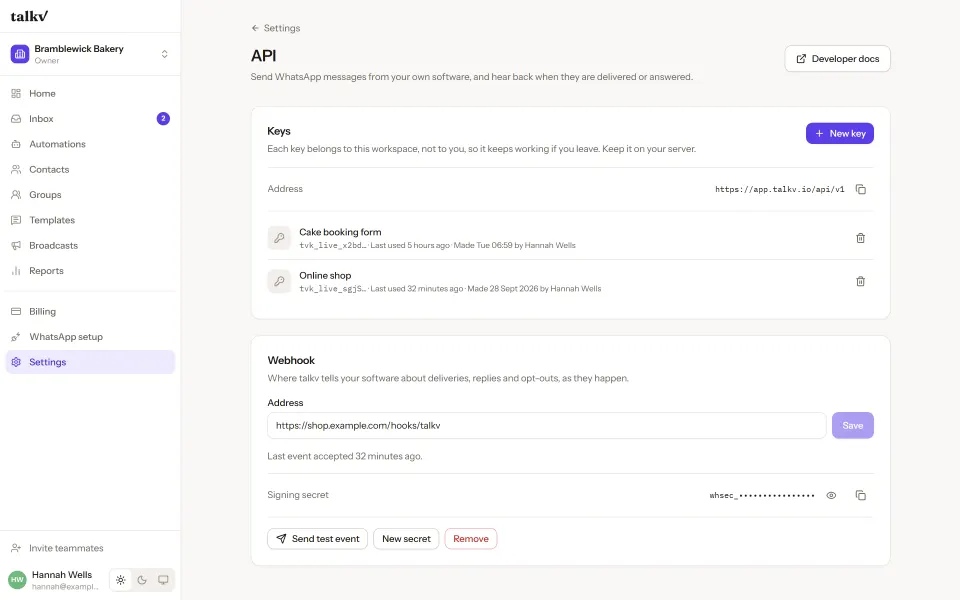
Settings, API, on a phone: the address to call and two keys, each with when it was last used.

Price and limits

No API fee.

A message through the API costs what the same message costs from the screens, charged when WhatsApp reports it delivered. Replies inside the 24-hour window carry no fee from us.

Otherwise a company would loop single sends to dodge a broadcast fee, which is a worse product and the same money.

What a message costs

Limits

  • 300 requests a minute per key, of which 60 may send. A 429 says how long to wait in Retry-After.
  • A broadcast's to takes up to 1,000 numbers. For more, put them in a group (PUT /contacts/{phone} with add_to_groups) and send to the group.
  • Lists are paged: ?page=2, 50 to a page, and meta.has_more says whether there is another.

The rest of it

Three documents, and one of them is a file.

Questions

Is the talkv API free to use?

There is no API fee. A message sent through the API costs exactly what the same message costs from the talkv screens — the workspace’s platform fee rate, charged when WhatsApp reports the message delivered. Meta bills the business separately, on its own card, for the WhatsApp message itself.

How do I stop the same message being sent twice?

Send an Idempotency-Key header with anything unique to the action, such as order-4521-shipped. For 24 hours the same key and body returns the first answer instead of sending again, so a timeout, a retry or a crash cannot produce a second message.

Does the API let me message somebody who unsubscribed?

No, and nothing can. Somebody who replied STOP is refused with the error code opted_out and the date they opted out, and a broadcast lists them under skipped. Only the person can undo it, by writing to the business again.

Do I have to turn the talkv API on?

Yes. The API is off for every workspace until talkv enables it, which we do on request while we are small. Once it is on, an owner creates keys in Settings → API.

Building something and stuck? Write to us. There is no developer support desk. It is the same inbox, answered by the people who wrote the endpoints.

Three colleagues gathered round a laptop in a glass-walled meeting room.

Your customers are waiting. Say hello today.

₹50 credit to start and no monthly fee. Your number and your chats stay yours.